My torrenting setup


Wow... Long time no see, fellows! My life has basically fallen apart over the past year. That's why it took me more than 9 months to pull myself together and write this article... But finally here we are! Let's see how my torrenting setup (that moved with me into another home) looks like.
Overall architecture
The architecture of my setup looks like this (pretty usual, to be honest):
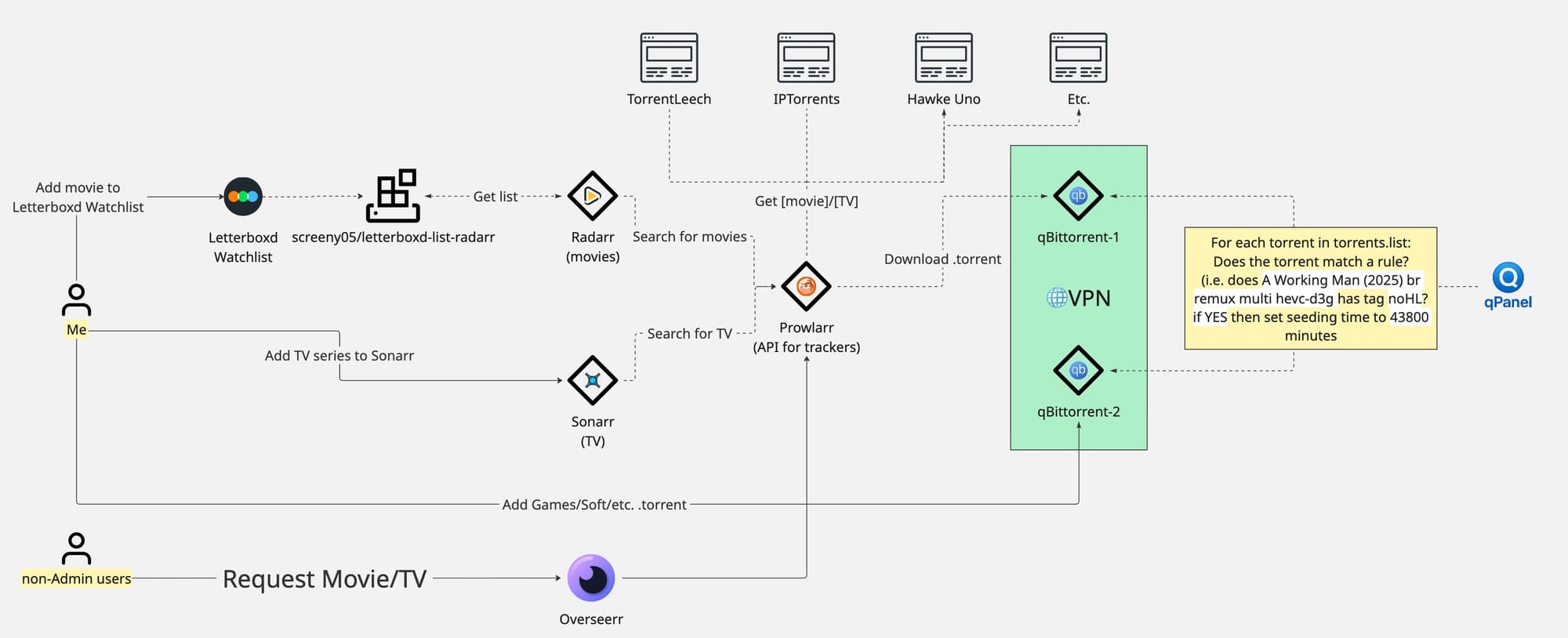
qBittorrent-1 container is hosted behind ProtonVPN. And qBittorent-2 is behind NordVPN. My internet speed is ~ 300/300 Mbps.
qPanel is my custom tool that I use to manage torrents on qBittorrent instances.
Let's take a closer look at all the tools and the way I deploy and use them.
Prowlarr
Think of Prowlarr as a conversion layer between your search requests and Torrent trackers' search endpoints.
Prowlarr is traditionally used by Radarr, Sonarr, Crossseed, etc automation tools. But if you like, you can simply search for torrent there yourself.
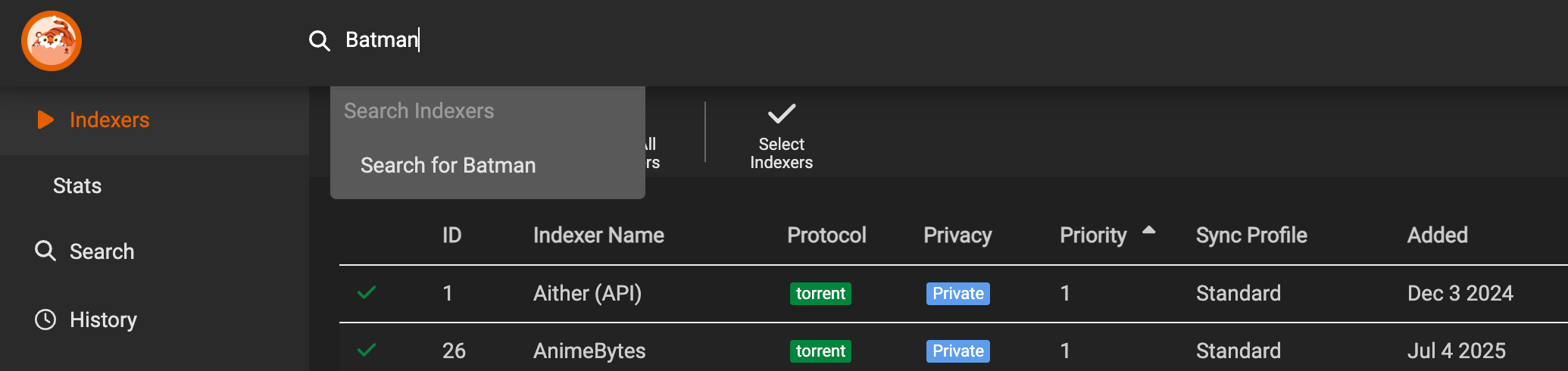
My Docker compose file for Prowlarr looks like this:
services:
  prowlarr:
    container_name: prowlarr
    environment:
    - PUID=1000
    - PGID=1000
    - TZ=Europe/Amsterdam
    image: lscr.io/linuxserver/prowlarr:latest
    ports:
    - 9696:9696
    restart: unless-stopped
    volumes:
    - /home/user/_configs/prowlarr/prowlarr:/config
Your torrent trackers should be configured in Prowlarr one by one like this:
Add tracker to Prowlarr
qBittorrent
As you can see on the diagram, I have two qBittorrent instances running behind VPN. qBittorrent-1 is used by Sonarr, Radarr and qBittorrent-2 I use to manually add torrents myself (Games, Soft, etc.).
Docker compose file for them looks like this:
volumes:
  protonvpn_data:

services:
  nordvpn:
    image: ghcr.io/wfg/wireguard
    container_name: nordvpn
    environment:
      - ALLOWED_SUBNETS=192.168.0.0/16
    cap_add:
      - NET_ADMIN
    sysctls:
      - net.ipv4.conf.all.src_valid_mark=1
    volumes:
      - /home/user/_configs/vpn/wg_nordvpn.conf:/etc/wireguard/wg0.conf
    ports:
      - 9088:9088
    restart: unless-stopped

  protonvpn:
    image: qmcgaw/gluetun
    container_name: protonvpn
    cap_add:
      - NET_ADMIN
    devices:
      - /dev/net/tun
    environment:
      - VPN_SERVICE_PROVIDER=protonvpn
      - VPN_TYPE=wireguard
      - WIREGUARD_PRIVATE_KEY=...
      - WIREGUARD_ADDRESSES=...
      - SERVER_COUNTRIES=Netherlands
      - VPN_PORT_FORWARDING=on
      - VPN_PORT_FORWARDING_PROVIDER=protonvpn
      - VPN_PORT_FORWARDING_STATUS_FILE=/tmp/gluetun/forwarded_port
      - TZ=Europe/Amsterdam
    volumes:
      - protonvpn_data:/tmp/gluetun
    ports:
      - 9089:9089
    restart: unless-stopped

  qbit-9089:
    deploy:
      resources:
        limits:
          cpus: '2.0'
          memory: 8G
    image: qbittorrentofficial/qbittorrent-nox:5.1.2-2
    container_name: qbit-9089
    restart: unless-stopped
    network_mode: service:protonvpn
    depends_on:
      - protonvpn
    environment:
      - PGID=1000
      - PUID=1000
      - QBT_EULA=accept
      - QBT_VERSION=latest
      - QBT_WEBUI_PORT=9089
      - TZ=Europe/Amsterdam
    tty: true
    volumes:
      - /home/user/_configs/qbit-9089:/config
      - /media/downloads:/downloads
      - /home/user/_data/vuetorrent:/vuetorrent

  qbit-9088:
    deploy:
      resources:
        limits:
          cpus: '1.0'
          memory: 2G
    image: qbittorrentofficial/qbittorrent-nox:5.1.2-2
    container_name: qbit-9088
    restart: unless-stopped
    network_mode: service:nordvpn
    depends_on:
      - protonvpn
    environment:
      - PGID=1000
      - PUID=1000
      - QBT_EULA=accept
      - QBT_VERSION=latest
      - QBT_WEBUI_PORT=9088
      - TZ=Europe/Amsterdam
    tty: true
    volumes:
      - /home/user/_configs/qbit-9088:/config
      - /media/downloads:/downloads
1. Movies
If I want to add a movie to my library, I go to https://letterboxd.com/, find the movie and add it to my Watchlist. You can see that I have a tool screeny05/letterboxd-list-radarr that is used by Radarr to watch my Letterboxd watchlist. Every 12 hours Radarr checks letterboxd-list-radarr and adds new content to its database.
Docker compose file for screeny05/letterboxd-list-radarr and Radarr looks like this:
services:
  radarr:
    container_name: radarr
    environment:
      - PUID=1000
      - PGID=1000
      - TZ=Europe/Amsterdam
    healthcheck:
      interval: 1h
      retries: 3
      test:
        - CMD
        - ls
        - -al
        - /mnt
      timeout: 10s
    image: linuxserver/radarr:latest
    ports:
      - 7878:7878
    restart: always
    volumes:
      - /home/user/_configs/media-box/radarr:/config
      - /media:/media
  letterboxd-list-radarr-web:
    restart: always
    image: screeny05/letterboxd-list-radarr:latest
    ports:
      - 5000:5000
    environment:
      - REDIS_URL=redis://redis:6379
    depends_on:
      - redis
  redis:
    restart: always
    image: redis:6.0
letterboxd-list-radarr is configured as Import List in http://YOUR_SERVER_IP:7878/settings/importlists:

2. TV Series
If I want to add a TV Series to my library, I go directly to Sonarr (http://192.168.0.2:8989/) and add the TV series there.
Add TV Series in Sonarr
Docker compose file for Sonarr looks like this:
services:
  sonarr:
    container_name: sonarr
    environment:
      - PUID=1000
      - PGID=1000
      - TZ=Europe/Amsterdam
    healthcheck:
      interval: 1h
      retries: 3
      test:
        - CMD
        - ls
        - -al
        - /mnt
      timeout: 10s
    image: linuxserver/sonarr:latest
    ports:
      - 8989:8989
    restart: always
    volumes:
      - /home/user/_configs/media-box/sonarr:/config
      - /media:/media
Overseerr
Overseerr is a WebUI for non-admin users to request content. I basically could you it as well (instead of Letterboxd watchlist and direct Sonarr access), but... I kinda got used to what I have 🤷♂️
Overseerr
Docker compose file for Overseerr looks like this:
services:
  overseerr:
    container_name: overseerr
    environment:
      - TZ=EU/Amsterdam
      - PORT=5055
    image: sctx/overseerr
    ports:
      - 5055:5055
    restart: unless-stopped
    volumes:
      - /home/user/_configs/media-box/overseerr:/app/config
3. Other tools
Autobrr
The behaviour of this tool is similar to Radarr + Prowlarr or Sonarr + Prowlarr combinations, but instead of "occasional" search requests towards trackers RSS feeds (or API), it watches trackers' IRC channels (or API sometimes) and grabs new releases as soon as possible. As the result, you get into the "swarm" of the first downloaders of a torrent and grind ratio by the early sharing within the swarm.
The configuration of the tool is quite complicated: you have to learn how to setup IRC account, issue keys and etc. So I think it doesn't make sense to explain it, I will not manage to make it understandable it anyway (I still keep forgetting how to setup IRC users to make the tool work for new trackers)... Try to set it up yourself. Sooner or later you'll get how it works.
Cross-Seed
The purpose of this tool is to query the list of the torrents that you have and find exactly the same torrents on other trackers you are a member of. I deploy it like this:
services:
  cross-seed:
    command: daemon
    container_name: cross-seed
    image: ghcr.io/cross-seed/cross-seed
    restart: unless-stopped
    user: 1000:1000
    ports:
      - 2468:2468
    volumes:
    - /home/user/_configs/cross-seed/config:/config
    - /media/downloads:/media/downloads
The config file (/home/user/_configs/cross-seed/config/config.js) looks something like this.
Grafana
I use Grafana to monitor my servers and Tracker's stats. My main Dashboard looks like this:
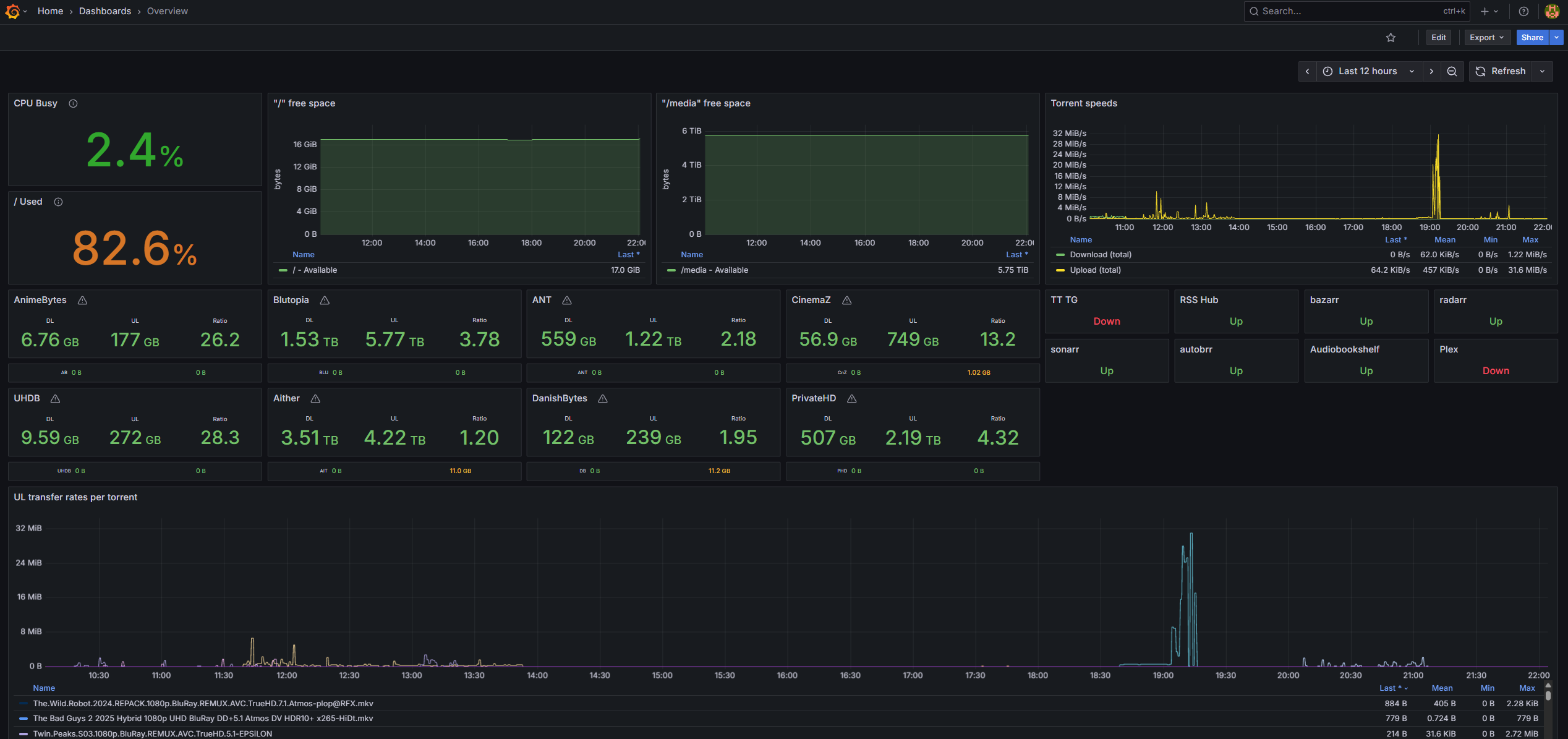
I use this Prometheus exporter to fetch ratio from my trackers' profiles and expose them to Grafana.
And that's basically it... If you have any questions, feel free to Join this Discord and reach me there!
